

Revision 1.0
Contents
- Introduction
1.1 Purpose and Scope of This Document
1.2 Terminology
1.3 Equipment List - Topologies and Tests
2.1 Basic Topology
2.2 Tests Performed
2.3 Conclusion
Figures
Tables
Revision History
| Revision Number | Description | Revision Date |
|---|---|---|
| 001 | Initial Release | March 2021 |
1. Introduction
1.1 Purpose and Scope of This Document
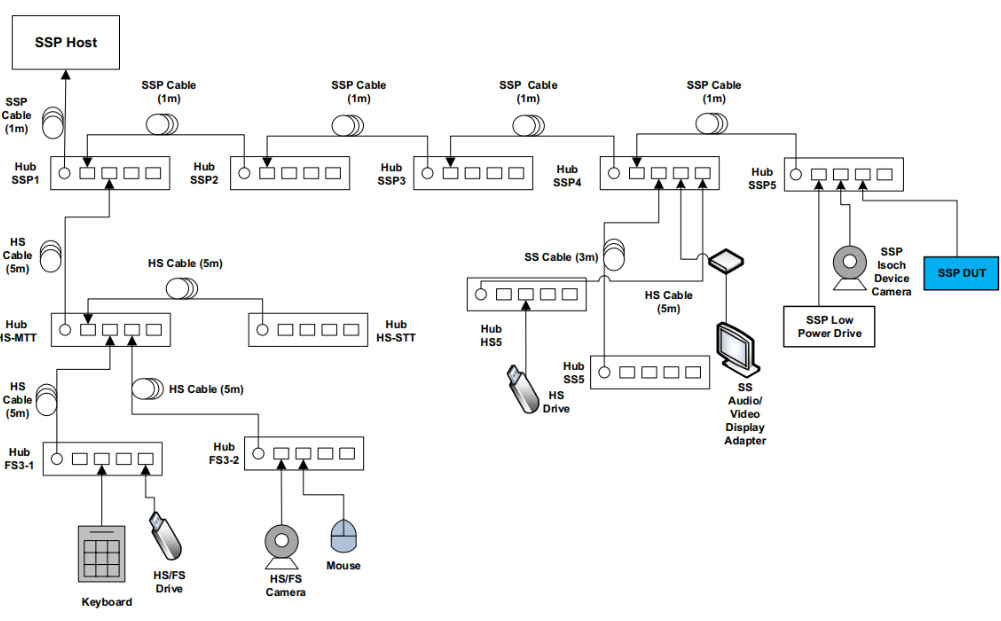
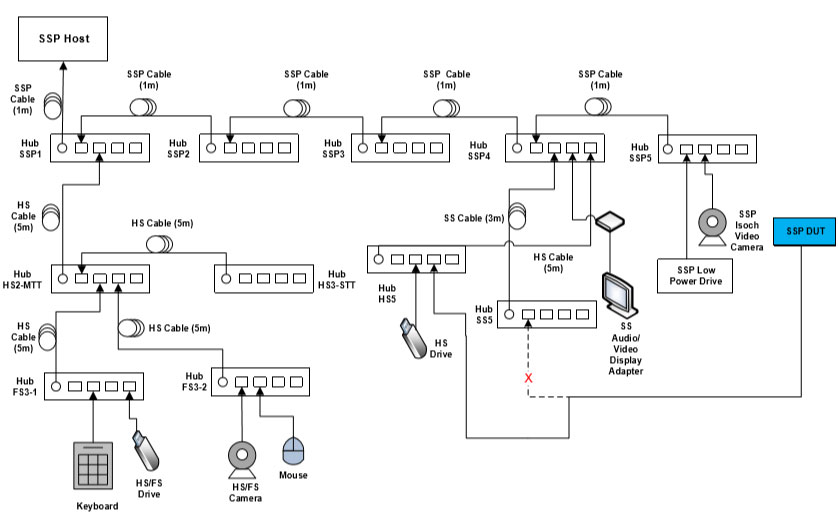
This document captures the testing equipment and topology that is used when testing the RealSense™ Cameras for USB interoperability. The equipment, topology, and testing are done in accordance with the specification outlined here:
https://www.usb.org/document-library/xhci-interoperability-test-procedures-peripherals-hubs-and-hosts.
1.2 Terminology
Table 1-1: Terminology
| Acronym | Term | Description |
|---|---|---|
| xHCI | Extensible Host Controller Interface | USB 3.1 host controller specification |
| SSP | SuperSpeedPlus | USB 3.1 Gen 2 (10Gbps) |
| SS | SuperSpeed | USB 3.1 Gen 1 (5Gbps) |
| HS | HighSpeed | USB 2 (480Mbps) |
| HS MTT | HighSpeed Hub w/MTT | HighSpeed Hub with multiple translation translator |
| HS STT | HighSpeed Hub w/STT | HighSpeed Hub with single translation translator |
| FS | FullSpeed | USB 1.1 (12Mbps) |
| DUT | Device Under Test | |
| U0/U1/U2/U3 | USB 3 Power States | U0 – Active current U1 – Standby with fast exit U2 – Standby with slower exit U3 – Suspend current |
| LPM | Link Power Management | Link – A USB connection between two USB ports LPM Transaction – USB transaction to transaction a link to a specific link power state L0/L1 – USB 2 Link power states |
| Driver Verifier | Driver Verifier Tool | Microsoft Windows tool for catching device driver bugs |
1.3 Equipment List
Table 1-2: Equipment List
| Device | Description |
|---|---|
| SSP Host | Dell XPS 8930 Desktop |
| USB Gen2 PCI Express Card | PCI Express Card with ASM3142 Chipset (ASMedia Technology Inc) |
| SSP Hub USB3.1 (Self-Powered) | Realtek RTS5423 (FW Version 103) |
| SS Hub USB3.0 Gen1 (Self-Powered) | Via VL811+ B2 step (FW Version 0982) |
| HS-MTT Hub (Self-Powered) | Belkin F5U237 |
| HS-STT Hub (Self-Powered) | EVB-USB2422 |
| FS Hub (Self-Powered) | Belkin Economy USB 1.1 7-Port Hub F5U027 |
| SSP Cable 1M | Cables included with Realtek RTS5423 |
| SSP Low Power Drive | Via VL716 Evaluation Board (USB-C 3.1 Gen2) (FW Version 95.c0.41.b0) |
| SS/SSP Video Camera | Logitech Brio |
| SS Display Adapter | DisplayLink: DisplayLink DL-P002 Development Board |
| HS Drive | Verbatim Store ’n’ Go USB2.0 64GB |
| FS Drive | |
| Keyboard | Microsoft Natural Keyboard Pro |
| HS/FS Camera | Microsoft LifeCam HD-3000 |
| Mouse | Microsoft Classic Intellimouse |
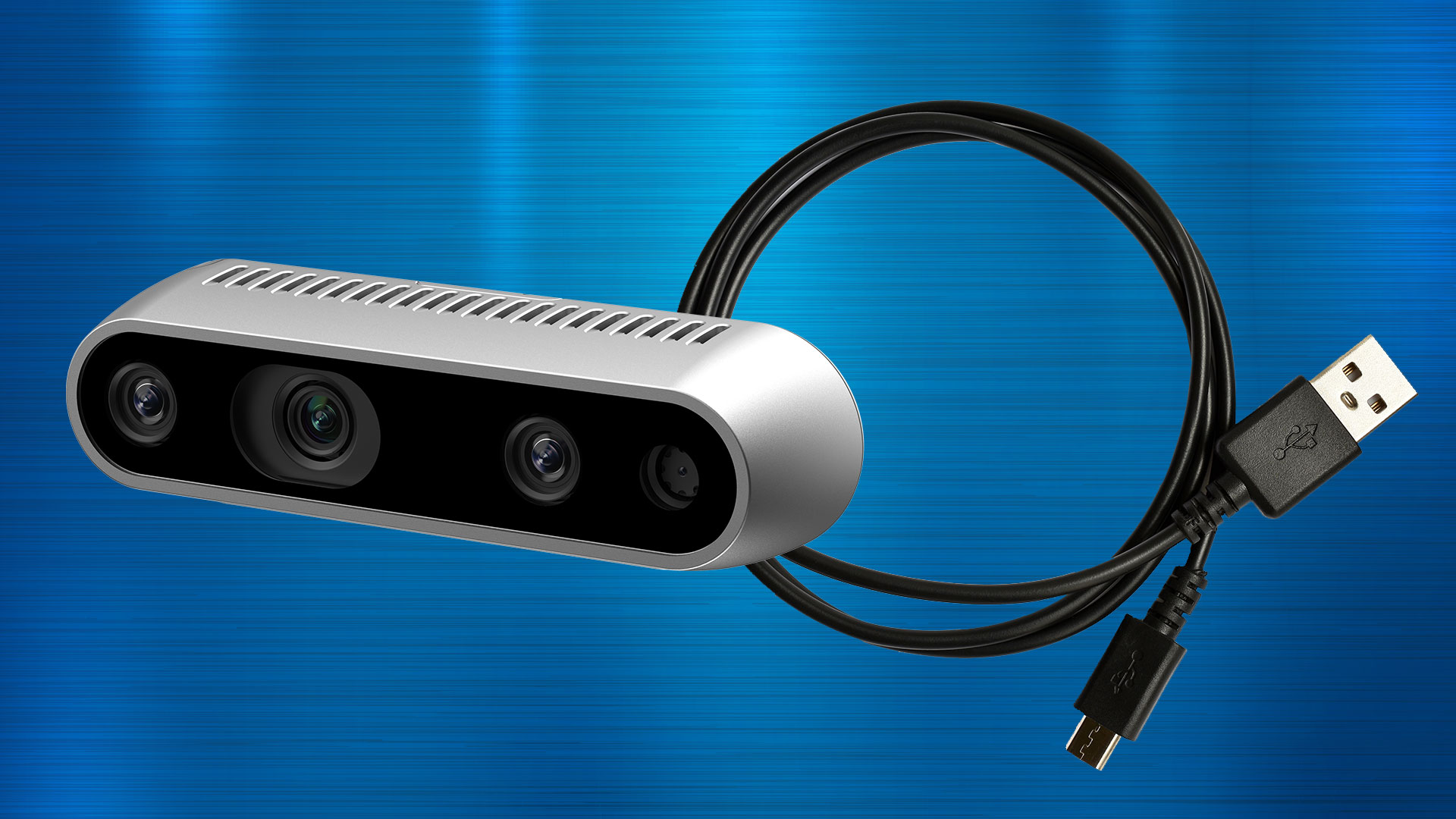
| RealSense™ Cameras | RealSense™ Depth Camera D415 RealSense™ Depth Camera D435 RealSense™ Depth Camera D435i RealSense™ Depth Camera D455 RealSense™ LiDAR Camera L515 |
2. Topologies and Tests
2.1 Basic Topology

2.2 Tests Performed
Table 2-1: Tests Performed
| Test Chapter | Description |
|---|---|
| Chapter 2: USB Peripheral Interoperability Test Steps | Section 2.1: Peripheral Interoperability Tests |
| Section 2.2: Peripheral Current Measurement | |
| Section 2.3: Peripheral U1/U2 Test Steps | |
| Section 2.4: Peripheral L1 (USB2 compliance) Test Steps | |
| Chapter 7: All Devices – Interoperability Test Steps | Repeats at: – All Devices Tests – All Devices Tests (After topology change 1) – All Devices Tests (After topology change 2) – Root Port Testing |
2.3 Conclusion
The RealSense™ Cameras outlined in this document have gone through the extensive tests outlined in the interoperability test procedures and performed by in-house validation teams, which can be found at usb.org. With the equipment list provided here, the peripheral cameras have passed all tests.
RealSense products are described herein. You agree to grant a non-exclusive, royalty-free license to any patent claim thereafter drafted that includes subject matter disclosed herein.
No license (express or implied, by estoppel or otherwise) to any intellectual property rights is granted by this document.
Technologies’ features and benefits depend on system configuration and may require enabled hardware, software or service activation. Performance varies depending on system configuration. No computer system can be secure.
RealSense technologies may require enabled hardware, specific software, or services activation. Check with your system manufacturer or retailer.
The products described may contain design defects or errors known as errata, which may cause the product to deviate from published specifications. Current characterized errata are available on request.
RealSense disclaims all express and implied warranties, including, without limitation, the implied warranties of merchantability, fitness for a particular purpose, and non-infringement, as well as any warranty arising from course of performance, course of dealing, or usage in trade.
All information provided here is subject to change without notice. Contact your representative to obtain the latest product specifications and roadmaps.
Copies of documents that have an order number and are referenced in this document may be obtained by calling 1-800-548-4725